WordPress Available (v1)
The recommended route is the free WPCode plugin — it survives theme updates. This also applies to WooCommerce (that’s a WordPress plugin; the snippet goes into the same site head).
Steps (recommended: WPCode)
- Install the free “WPCode” plugin: Plugins → Add New Plugin (older WP versions: “Add New”) → search for “WPCode” → Install Now → Activate
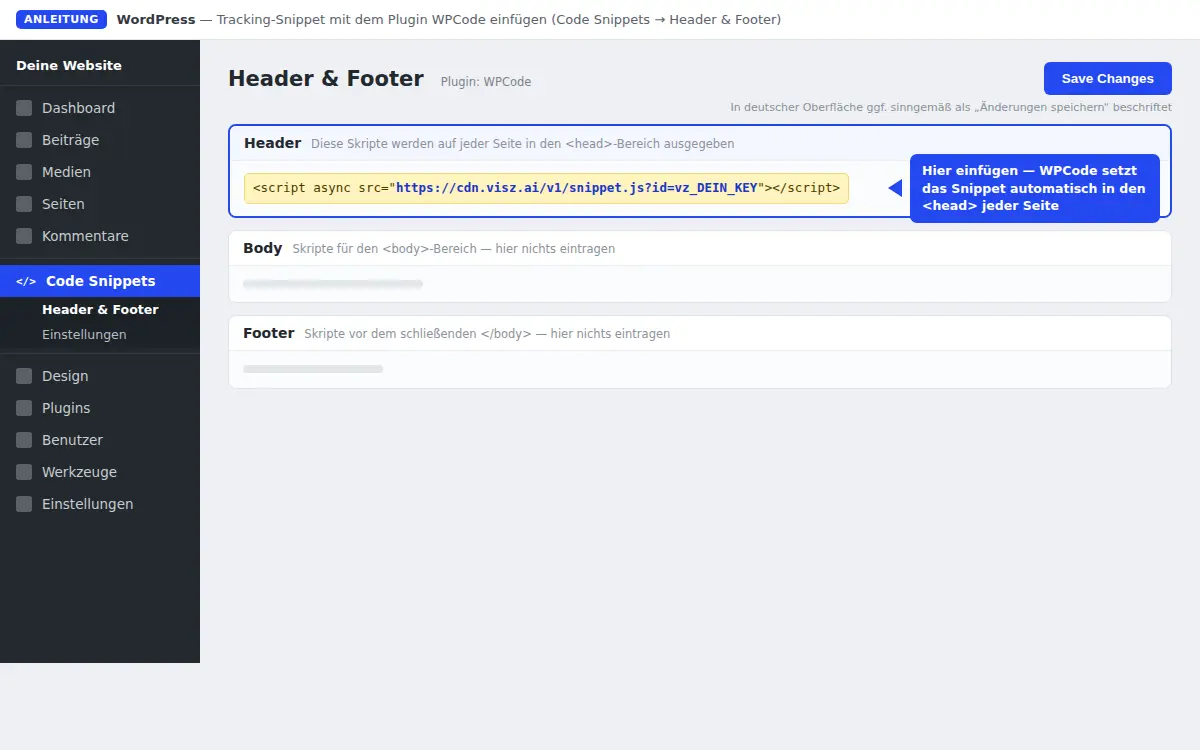
- Open Code Snippets → Header & Footer in the admin menu
- Paste the snippet into the top “Header” box:
<script async src="https://cdn.visz.ai/v1/snippet.js?id=vz_your_key"></script>- Click Save Changes.
Alternative without a plugin (classic themes only)
Appearance → Theme File Editor → header.php, snippet right before
</head> → Update File. Careful: theme updates overwrite this — the plugin
route survives.
Notes
- The snippet loads site-wide — put it in the head, not in a single post or page.
- Caching plugin (W3 Total Cache, WP Rocket, etc.)? After inserting, clear the cache, otherwise an old page without the snippet gets served.
- There is no Visz WordPress plugin in Layer One — WPCode or the theme-header line is the official way.
- Self-hosted WordPress: no plan restriction. On WordPress.com, header code requires a paid plan.
Next: Continue to verification.
Last updated:
Last updated on